I am getting a CORS error only after deploying my app to a service running on Azure.
I have both http://localhost:3000 and the url for the deployed version (e.g. https://my-app-service.azurewebsites.net) added to the authorized domains list in Frontend SDKs.
The error in the console:
Access to fetch at ‘https://api.stytch.com/sdk/v1/projects/bootstrap/’ from origin ‘https://my-app-service.azurewebsites.net’ has been blocked by CORS policy: Response to preflight request doesn’t pass access control check: No ‘Access-Control-Allow-Origin’ header is present on the requested resource.
Any idea what I’m missing here?
Thanks!
Hey Drew!
It looks like the Stytch SDK bootstrap is failing due to the CORS error - could you please double-check your CORS configuration in Azure? You might need to enable Access-Control-Allow-Credentials on the app service.
We’ve also seen this happen before with specific adblockers causing the preflight OPTIONS request to fail; it may be worth trying an incognito/private window with no extensions running to see if the same error still occurs.
Hey Johanan, thanks for the quick reply!
Those both seemed like really plausible ideas and I was sure one would work, but unfortunately even with Access-Control-Allow-Credential enabled and browsing the site in a private window, I am still getting the same error.
Thanks again!
Thanks for your reply!
In terms of your CORS config in Azure, just to double-check, when you’re testing this locally did you also add localhost:3000 as an allowed origin?
Microsoft has some docs around this here, since this doesn’t appear to be an error originating or specific to Stytch: Tutorial: Host a RESTful API with CORS - Azure App Service | Microsoft Learn
It works fine running locally with no CORS-specific logic in the app. I added the localhost address to the Authorized Domains list within the Frontend SDKs menu on the Stytch dashboard, which is where I’ve also put the URL to the deployed instance.
To me, the network request looks like it’s being rejected by CORS from the Stytch side, so would that be an issue with CORS in Azure or something up in Stytch where it’s not recognizing that the domain is authorized?
Hi @Drew_Nelson ,
Thanks for your reply!
If the URLs weren’t properly allowlisted I’d believe you’d see a bad_domain_for_stytch_sdk error instead.
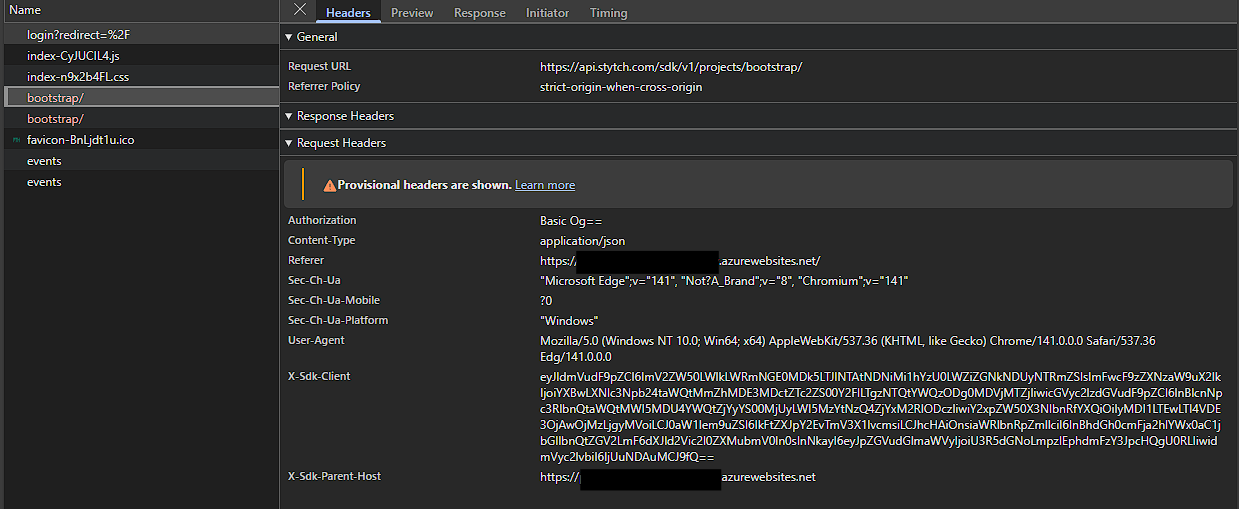
Would it be possible to please share the preflight request and response for the CORS error? We’d like to take a look at the response code and the headers in particular - thanks!
Sure thing! Here are some screenshots, let me know if you need anything else!
Sorry it wouldn’t let me do 2 images at once and I forgot to add the second - here it is.
Thank you!
Hi @Drew_Nelson ,
Thanks for sharing these screenshots!
I believe the CORS error is actually a red herring here - the Stytch JS SDK bootstrap errors with a 404, which leads to the preflight request failing.
It looks like the /sdk/v1/projects/bootstrap call isn’t including a public token, which is why it’s 404ing. Could you please double-check that for your Azure deployment that you’ve configured the appropriate Stytch public token? e.g. in the client init if you’re using the pre-built UI: JavaScript SDK - Installation | Stytch Consumer authentication
@johanan-stytch that was absolutely the issue. I dug in and found that there was a problem with the token not making it into the app in the deployed environment. Once I got that sorted, this issue went away.
Thank you so much for your help!